
Frequently Asked Questions
No matching questions — try a different search.
Artwork & Sizing
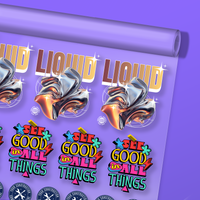
Yes, you can have multiple designs and sizes on one DTF Transfer Gang Sheet.
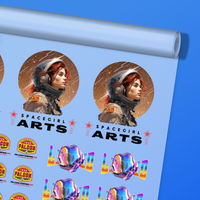
Gang sheets are the perfect solution to get multiple designs and variations of sizes all printed together conveniently for you. Our gang sheets are 56 cm wide and come in the following lengths:
- 61 cm
- 152 cm
- 213 cm
- 305 cm
- 457 cm
- 610 cm
- 915 cm
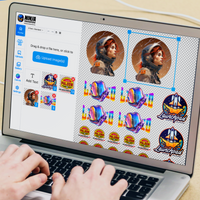
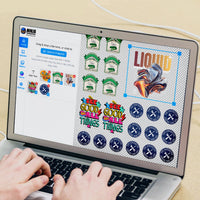
Note: We only accept ready to print vectorised gang sheets. Otherwise, you can build your own gang sheet here on a roll or order them on our Transfers By Size product page.
Absolutely! When you add your art to the DTF Transfers By Size product page, you can enter your hex code for our designers to match in our "Notes To Designers", text box.
Yes, our uploader can automatically remove your background.
Our talented team of designers will make sure your art looks perfect for print.
Any special requests, such as remove a background, change the colour, etc., can be left in the Notes for our Designers section after you upload your design on our products page.
No, you do not need to mirror your artwork when uploading it to our website. As long as you upload a high resolution or vector file, we'll be able to turn your artwork into a DTF transfer or UV DTF 3D PermaSticker™.
We accept a wide range of files types, including:
- PSD (Photoshop)
- PNG
- AI (Adobe Illustrator)
- JPG
- SVG
Our preference: SVG files work best because it allows us to re-size artwork without losing any quality. However, as long as you upload a file (PNG, JPG, PDF) with 300 DPI, we'll be able to re-size the image to your liking, without losing any quality whatsoever.
If you're having trouble converting your design to one of these file types, or having issues getting a high resolution, we'll be happy to help. Contact us at 888-356-3665 and we'll get your design in order for you.
Ninja Transfers does not charge for any file or art setup, however, when uploading your art, the following file types are preferred.
- PSD (Photoshop)
- PNG
- AI (Adobe Illustrator)
- JPG
- SVG
Our preference: SVG files work best because it allows us to re-size artwork without losing any quality. However, as long as you upload a file (PNG, JPG, PDF) with 300 DPI, we'll be able to re-size the image to your liking, without losing any quality whatsoever.
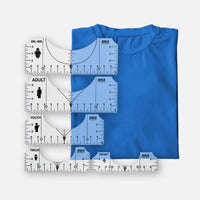
For women's shirts, a 23 cm by 23 cm DTF Transfer design typically works the best.
Although there can be a large variance in sizing between a Women's XS and a Women's 2XL, we still find that the 23 cm by 23 cm sizing works well.
For information on Adult sizing and Youth sizing, check our other FAQ sections.
For youth shirts, a 20 cm by 20 cm DTF Transfer is suitable.
Although there's a fairly large variance in sizing between a Youth XS and a Youth L & Youth XL, an 20 cm by 20 cm DTF Transfer design is still suitable.
For information on Adult sizing and Women's sizing, check our other FAQ's.
For full back shirt prints, we recommend going with our 23 cm x 28 cm option, up to 30 cm x 43 cm depending on the size of the shirt.
For adult shirts, even with a size scale of Adult S through Adult 5XL, 28 cm by 28 cm or larger is recommended.
However, with DTF transfers you are able to modify the sizes as you like and still retain the bulk discount pricing on the whole order.
If you prefer to modify the design size based on shirt size, we recommend the following:
Adult Small through 2XL: 28 cm by 28 cm or larger
Adult 3XL through 5XL: 30 cm by 36 cm or larger
For information on Youth sizing and Women's sizing, check our other FAQ sections.
For a left chest logo, we recommend the following sizes:
- Size range: 6.5–11.5 cm width, 6.5–11.5 cm height
- Average size: 9 cm W x 5 cm H Adult, 6.5 cm W x 4 cm H Youth
- Standard placement: Approx. 7.5 cm down from the bottom of the collar, centred at the edge of the collar, or 10–15 cm over from the centreline
Ordering
If your order hasn't made it to our production queue, you can certainly cancel your order and be refunded in full. Please keep in mind, all orders at Ninja Transfers print and ship within 24-48 hours of being placed.
We know things happen and will always do our best to accommodate our customers. All we ask is that you please be mindful when cancelling your order.
For assistance on canceling your order, contact us at 888-356-3665
No, we do not provide proofs or mockups of your design on DTF Transfer or UV DTF 3D PermaSticker orders.
Yes, our UV DTF 3D PermaStickers are perfect to decorate vehicles with. You can order your UV DTF 3D PermaStickers here.
No, at this time we do not offer holographic UV DTF 3D PermaStickers.
To check the status of your order, contact us directly at 888-356-3665 and we'll provide you with the most up to date information on your order's status.
To get a custom size on your DTF transfer, check off the "Custom Size" option after uploading your artwork. Then, you'll be able to input the dimensions you'd like.
Ninja Transfers offers Premium DTF Transfer Sample Packs for free, directly on our website.
To order, you can click the link below. All sample packs are sent by courier, with delivery times based on your location.
Our DTF Transfer Sample Pack includes:
- Several DTF Transfers that demonstrate the quality and vibrancy of DTF
- A selection of our premium UV DTF PermaStickers - vibrant, durable 3D stickers that work on any hard material
First, you'll need to choose the size of your DTF Gang Sheet. All gang sheets are 56 cm wide, with these length options:
- 61 cm
- 152 cm
- 213 cm
- 305 cm
- 457 cm
- 610 cm
- 915 cm
After selecting the size of your DTF Gang Sheet, you'll then have to upload the artwork for it. We accept four different file types for your DTF Gang Sheet upload. These file types include:
- PNG
- SVG
- EPS
Our Recommendation: We prefer vector images (SVG) when uploading DTF Gang Sheets. This file type is the best for image quality and it easily allows us to modify your artwork if you want us to do so.
Follow these four simple steps to get your artwork uploaded and order placed:
- Upload your designs (any file type works, up to 5GB)
- Leave a detailed note on any tweaks you'd like done to your design (specific sizing, colour change, background removed, etc.)
- Select your DTF Transfer size
- Select your quantity. There's no limit on how many DTF Transfers you can order!
For a step-by-step guide on how to place your order for DTF Transfers by size, watch our tutorial below.
If there are any issues with your DTF Transfers order, we're happy to work with you and resolve any problems. Whether it's an issue with quality, colour, or quantity, we'll work to ensure you're satisfied with your order.
Contact us via our livechat system with any issues, and please include photo(s) as a reference point. You may also contact us directly through our customer service line, 888-356-3665.
If you're order is running late, please contact us directly at 888-356-3665 and we'll do everything we can to ensure your order gets to you as soon as possible.
Pricing
No, all of our pricing is based solely on size and quantity. You can add as many colours as you'd like to your DTF Transfer designs and the price will remain the same.
Shipping
At this time, we ship within the UK only.
We know your deadlines matter, so we work hard to dispatch your order quickly. Delivery times depend on the shipping option you choose at checkout.
Orders over £100 qualify for free UK shipping.
We offer several delivery options at checkout so you can receive your order as quickly as you need it. Shipping costs are calculated at checkout based on your delivery address.
Orders over £100 qualify for free UK shipping.
Tools & Tips
High-quality DTF transfers are non-toxic once pressed and safe to wear, including on children’s apparel. Ninja Transfers are printed with OEKO-TEX certified inks, meaning they are safe for skin contact after application.
Yes, once pressed, DTF transfers are waterproof and bond permanently to fabric fibres. They are ideal for t-shirts, hoodies, tote bags, jerseys, and lightweight outerwear. Ninja Transfers are water-resistant and laundry-safe after pressing.
Our DTF Transfers are extremely lightweight and versatile. They work great on lightweight polyester / moisture wicking material and are very breathable across all fabric types.
Yes, Ninja Transfers' high-quality DTF transfers are washer and dryer safe. Ninja Transfers are tested to 100+ wash cycles and can go in the dryer on medium heat. Avoid fabric softener for best longevity.
Yes, you can press DTF transfers at home and all you need is a household iron. While using a traditional heat press is recommended for best results, Ninja Transfers DTF transfers can still be applied with just an iron -- watch our iron-on instructions here. Ninja Transfers are beginner-friendly and work even on affordable entry-level presses.
Ninja Transfers provides premium DTF Transfers that are powered by Easy Peel Technology (Hot Peel).
Press with medium pressure at 149°C-160°C for 12-15 seconds.
Remove pressure and heat, wait a few seconds, and lift the transfer from one corner and gently peel back and apply even pressure.
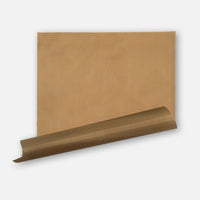
Place the baking parchment included with your order on the design and press again for 15 seconds to enhance feel, increase durability and remove shine.
DTF transfers only crack if pressed incorrectly -- usually from low heat, uneven pressure, or insufficient press time. When properly applied, Ninja Transfers are stretch-tested and designed not to crack, even on athletic wear and ribbed fabrics.
Here at Ninja Transfer, we've spent years perfecting the art of printing DTF Transfers.
From investing into the industry-leading Industrial DTF Printers and Dryers, to calculating the exact formula for Premium Matte Inks and TPU Powders to print on the highest quality of film, it's no secret as to why Ninja Transfers has grown so quickly in the DTF Transfer space.
DTF film peeling is almost always caused by not enough pressure or heat during the press. To prevent peeling, press at 154°C with firm pressure for 12 seconds and peel immediately while hot. If any part doesn’t stick, lay the film back down and repress with slightly more pressure or increase heat by 6–8°C. Always finish with a 15-second final press using baking parchment to fully bond the adhesive and prevent edge lift or peeling over time.
Watch our DTF heat pressing tutorial video here for further information
To ensure your DTF transfer looks professionally pressed every time, follow these four simple steps. We recommend watching our step-by-step tutorial:
1. Position Your Design
Position your transfer in the desired location and make sure you are not pressing over large wrinkles. Heat-resistant tape is recommended when pressing on hats or when using a household iron to prevent the transfer from moving. You'll learn when it's needed with experience
2. Press
Press the transfer at 155°C with medium to high pressure for 13 seconds. It is always recommended to test one piece first. Use baking parchment to protect your garment from touching the iron directly. You cannot damage the transfer by pressing with more heat, pressure, or time, however, it could scorch the garment.
If your settings are scorching the garment, the first step would be to reduce pressure. If that doesn’t work, retain the reduced pressure and reduce the heat by 6-8°C. With a little practice, you’ll find the right settings for each garment and material.
3. Peel Hot After a Few Seconds
With our proprietary Easy Peel Technology, you can peel hot or cool. Wait a few seconds (or more) and peel! If parts of the design are not sticking, lay it back down and press again with added pressure and heat (+8°C). If unsuccessful, increase heat by 8°C increments until it works. Remember, the great thing about Ninja Transfers is that repeated pressing won't damage the transfer.
4. Final Press & Wash Instructions
Important: While the majority of other DTF companies advise you to press it just once, this is improper. After hundreds of wash tests, we have found that a final press is imperative to create a superior product.
After the design is transferred onto the garment, with the film peeled off, cover the design with the provided baking parchment and press for ~15 seconds. By doing so, it enhances the value of your product by greatly improving the durability and softness as well as reducing the shine. For best results and longevity, wash the garment inside out in cold water and dry on low heat or hang to dry. Washing it with standard settings is fine, but it lasts longer with more delicate settings.
For step-by-step pressing instructions for household irons or a Cricut EasyPress, click here.
How to Machine Wash:
- Turn your pressed shirt inside-out before washing.
- Separate similar colours, weight, and textures. Make sure to not overfill the washer.
- Use mild detergent and avoid bleach with cold water on a gentle cycle.
We recommend waiting at least 24 hours after pressing to wash your DTF garments to ensure the transfer is completely adhered to the material and the adhesive is fully cured and locked in. This will ensure that it is durable in the long term.
Warm water, harsh detergents, and aggressive wash cycles can damage both the garment and the transfer itself.
How to Dry:
We recommend hang-drying on a plastic hanger, but a drier works fine if you follow the steps below.
- Turn your pressed shirts inside-out before drying.
- Separate similar colours, weight, and textures.
- Use the lowest possible heat setting or Permanent Press.
DTF Transfers, which stands for Direct to Film Transfers, are an incredible new way of transfering any image onto any material or colour without having to worry about technical printing specs you may have had to worry about in the past.
Every transfer is printed the same way with the same underbase. There are exceptions to this rule of course, but generally speaking, everything is the same on every material you transfer onto, making it much easier to have confidence that all transfers will adhere and appear as you desire on every order.
There is no limit to the colour range, number of colours, or quantity that you can order in DTF transfers.
This wasn't possible with screen printing transfers because you needed to make sure that you were ordering the correct ink type for the garments you would be printing. It would also be quite cost prohibitive to order a small quantity of screen print transfers, especially when ordering a high colour count. With DTF transfers, this is a thing of the past.
You no longer have to be a t-shirt genius. Your orders will be more profitable and consistent with DTF transfers.
If your transfer is not applying correctly, stop peeling, lay it back down, and trouble shoot as follows:
- If some or all of the design does not transfer AND it was cool when peeling, it means there was not enough heat, pressure, or time. Press your transfer again with more pressure and time first(+5-10 seconds).
- If that doesn’t work, try 8°C heat increments until you find the sweet spot. You truly cannot damage the transfer by pressing multiple times.
DTF Transfers can be pressed onto almost every type of fabric. From common fabrics like 100% cotton and 50/50 polyester blends, to more niche options like denim, leather, and satin.