Skip to content
Free Delivery on Orders £100+

DTF Gang Sheet Upload

As Low AsFrom 0.15p/sq cm Printed by Ninja. Ships fromShips from 🇬🇧

Works on Any Fabric or ColourAny fabric or colour

Vibrant Colours & Ultra-fine DetailsVibrant Colours & Details

Certified for 100+ Washes100+ Washes i

100% Satisfaction GuaranteedSatisfaction Guaranteed


Price: £7.00 Regular price:

Upload Your Artwork

Upload your file(s)

Drag and drop file(s) here or click to browse

Login to see previous designs

OR IMPORT FROM
Added Product successfully added to your basket

Add another Gang Sheet

Browse
Drag and drop file(s)
Finance with Buy Now Pay Later options
PayPal, Klarna and Clearpay payment options
DTF Gang Sheet Upload
From £5.95

Product Details

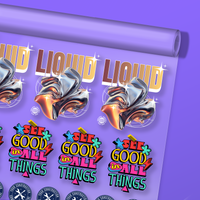
Experience professional-grade custom gang sheets made simple with Ninja Transfers. Whether you choose our high-definition Standard 5-Colour print or step up to our VIVID AF 9-Colour upgrade, you’ll get stunning, retail-ready results on every garment.

Upload your print-ready gang sheet and choose the print method that fits your artwork and budget. Both options deliver outstanding durability, a soft feel, and eye-catching colour on any clothing type.

Print Option Breakdown

Standard 5-Colour Print (High-Definition Quality)

The Lowdown: Our high-definition standard print handles standard full-colour designs, fine details, and smooth shading with incredible precision. It’s the tried-and-tested favourite used by thousands of brands.

Best For: Everyday clothing graphics, company workwear, full-colour logos, and detailed artwork.

What You Get: Vibrant full colour, crisp details, high wash durability, and a smooth, flexible finish.

VIVID AF 9-Colour Upgrade (Ultra-Spectrum Colour)

The Lowdown: An extended colour upgrade that pushes print capabilities even further. By adding four extra ink channels, VIVID AF unlocks shades and visual intensity that standard printers simply can't reach.

Best For: Ultra-bright graphics, photos, complex artwork, and designs requiring maximum visual punch.

What You Get: Supercharged brightness, ultra-smooth colour transitions, and photorealistic depth.

Price Calculator

Features

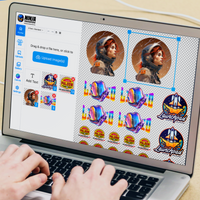
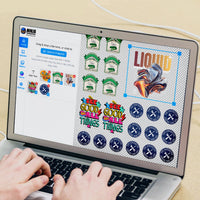
  • Auto Build: Build your gang sheet in seconds with our Auto Build feature. Simply upload your images, choose the quantity and size, and hit 'Apply.' The builder will automatically arrange your images, notify you if more sheets are needed, and confirm everything is correctly placed and high resolution before checkout.
  • Streamlined Workflow: Simplify your printing workflow with our DTF Gang Sheet Builder. Design, arrange, and optimise your gang sheets effortlessly for a smoother production experience.
  • Multiple Sizes: Build custom layouts that optimise space and streamline your printing process across five different sizes.
  • Design Flexibility: Experiment with various design combinations on a single sheet. Our Gang Sheet Builder empowers you to explore creativity while maintaining precise print quality.
  • Print with Confidence: Ensure consistent and vibrant results with your customised gang sheets. From intricate details to vivid colours, your prints will captivate every time.

Satisfaction Guarantee

We stand behind the quality of every transfer and sticker we print. If you’re not completely satisfied, we’ll reprint your order with a new or revised file at no cost to you.

Learn More

Pressing Instructions

Click here to watch our DTF Transfer Pressing Instructions Tutorial Video.

To ensure your DTF transfer looks professionally pressed every time, follow these four simple steps.

1 - No Need To Pre-Press or Pre-Iron

Removing moisture and wrinkles from the product is unnecessary with Ninja Peel Transfers. Only do a prepress if you prefer.

Pro Tip: If you’re pressing onto a garment or surface you haven’t worked with before, we recommend doing a small test press first to confirm the settings and ensure the best results.

2 - Position Your Design

Position your transfer in the desired location and make sure it is flat before pressing. You can press across seams, for example on 6-panel caps and side seams of t-shirts. Heat-resistant tape is recommended when pressing on caps or when using a household iron to prevent the transfer from moving. You'll learn when it's needed with experience.

3 - Press & Peel after a few seconds

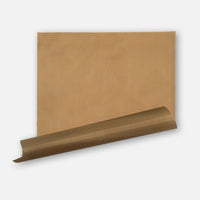
Press the transfer at 155°C / 310°F with medium to high pressure for ~12 seconds. It is recommended to test one piece first. Use baking paper to protect your garment from touching the iron directly. 

Wait a few seconds and peel! If parts of the design are not sticking, lay it back down and press again with added pressure and heat (+8°C / +15°F). If unsuccessful, increase heat by +8°C / +15°F increments until it transfers correctly. Remember, the great thing with Ninja Transfers is that repeated pressing won't damage the transfer.

If your settings are scorching the garment, the first step would be to reduce pressure. If that doesn’t work, retain the reduced pressure and reduce the heat by 5–8°C / 10–15°F. With a little practice, you’ll find the right settings for each garment and material.

4 - Final Press & Wash Instructions

Important: While the majority of other DTF companies advise you to press it just once, this is improper. After hundreds of wash tests, we have found that a final press is imperative to create a superior product. After the design is transferred onto the garment, with the film peeled off, cover the design with provided baking paper and press for 15 seconds. Doing so enhances the value of your product by greatly improving the durability and softness as well as reducing the shine.

For step-by-step pressing instructions for household irons or a Cricut EasyPress, click here.

Shipping & Returns

Orders over £100 of transfers will automatically qualify for Free Shipping. Express shipping options as fast as 1 Working Day available at checkout.

Read our Shipping Policy for more information.

Refunds & Reprints

Contact us within 45 days of receiving your order to submit a request for a refund or reprint. We will reprint any order where there is a print quality or adherence issue. However, we will not issue a reprint if the uploaded file is low quality. If you'd like a refund or reprint for another reason, it must be approved by management first.

Art Upload Recommendations

All file types are accepted. Vector files are recommended for the best results, and raster artwork should be at least 300 DPI. For optimal colour accuracy and vibrancy, we recommend designing in the Adobe RGB (1998) colour profile.

Minimum Size: While DTF handles fine details well, elements smaller than 0.5mm (0.02 inches) may not transfer properly.

Tip: If you're using Canva or Procreate, exporting your document as a PDF is recommended.

The Next Generation of DTF Transfers

VIVID AF is Ninja’s 9-colour upgrade for brighter colours, smoother gradients, and truer matches. Choose Standard 5-Colour or VIVID AF 9-Colour based on the finish and price point that best fits your artwork.

Standard 5-Colour Print
High-Definition Quality
VIVID AF 9-Colour Upgrade
Ultra-Spectrum Colour
CMYK + White
CMYK + RGBO + White
Everyday clothing, workwear, logos and detailed artwork
Ultra-bright graphics, photos and complex artwork
Vibrant full colour, crisp detail and smooth shading
Supercharged brightness and ultra-smooth transitions
High wash durability with a smooth, flexible finish
Photorealistic depth and maximum visual punch

Ninja Delivers Vivid Prints & Higher Profits

Every print you press should boost your bottom line — and with Ninja, it does. Our vivid DTF transfers combine sharper colours, stronger durability, and cleaner detail that sells.

Ninja's DTF Transfers deliver vibrant, durable prints on any material — from hats and workwear to nylon and denim

Works on Any Fabric or Colour

Our specially formulated DTF inks deliver deeper colours, a wider colour range, and the brightest white ink in the DTF industry

Unrivaled Colour Spectrum & Brighter Whites

Our DTF transfers stretch without cracking and hold up over 100+ washes, thanks to our premium film, ink, powder, and pressing process

Stretchability Means Durability

Our transfers capture details as fine as 3 pixels, delivering cleaner edges and sharper text—even on separated elements.

Sharper Details & Cleaner Edges

Ninja's DTF Transfers deliver vibrant, durable prints on any material — from hats and workwear to nylon and denim

Works on Any Fabric or Colour

Our specially formulated DTF inks deliver deeper colours, a wider colour range, and the brightest white ink in the DTF industry

Unrivaled Colour Spectrum & Brighter Whites

Our DTF transfers stretch without cracking and hold up over 100+ washes, thanks to our premium film, ink, powder, and pressing process

Stretchability Means Durability

Our transfers capture details as fine as 3 pixels, delivering cleaner edges and sharper text—even on separated elements.

Sharper Details & Cleaner Edges

Easily Applies in Seconds

Thanks to our proprietary Ninja Peel Technology, our DTF Transfers deliver professional results in just 13 seconds — making it easier than ever to press on anything!

View DTF Pressing Guide

Ninja Transfers Customer Feedback

Customer Reviews

Go to top Top